Atmosphere

Your music, beautifully kept.
A fast, native music library, player and downloader for Windows, macOS and Linux.


Windows · macOS · Linux Built with Rust and Tauri 2 Engine: yt-dlp and ffmpeg Size: about 8 MB

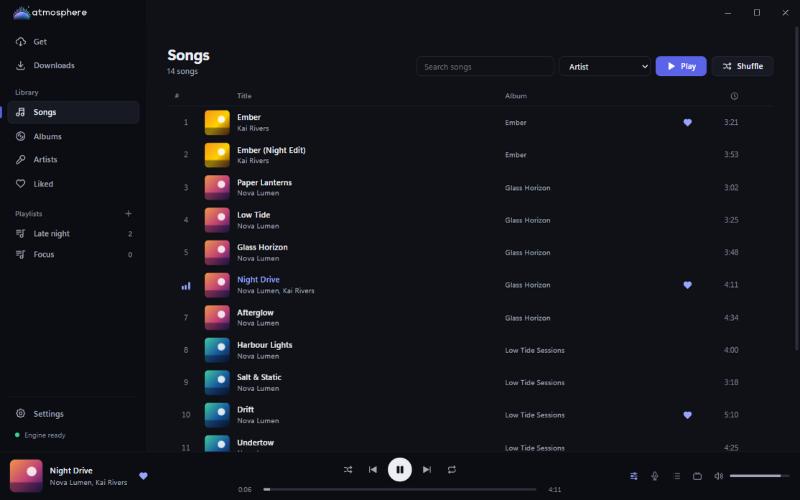
Atmosphere's library view with the player bar

--- Atmosphere puts your library, a good-sounding player and a downloader in one app. Paste a link from SoundCloud, YouTube, Bandcamp or [1,000+ other sites](https://github.com/yt-dlp/yt-dlp/blob/master/supportedsites.md). Atmosphere shows you exactly what's available and saves a properly tagged file. The file lands in your library, attached to its artist and album, ready to play with synced lyrics. It's built for media you **own or have the rights to keep**, such as your own uploads, artist-enabled downloads and Creative Commons releases, and it never bypasses DRM. ## A look around
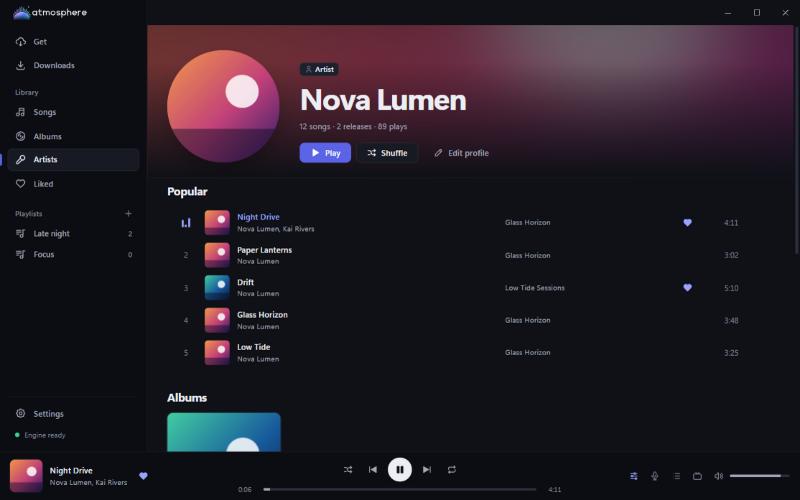
Artist profile
Artist profiles: popular tracks, releases, appears-on, and your own photo and bio.
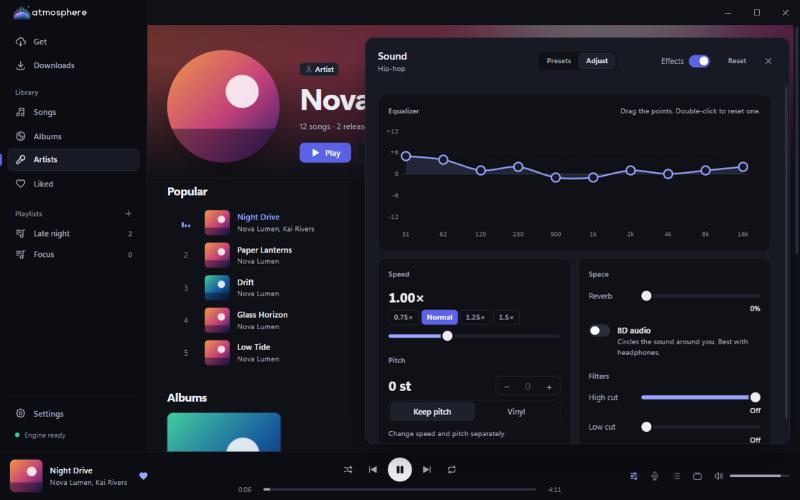
Sound panel
Sound: a drag-to-shape EQ, presets, independent pitch and tempo, reverb and 8D.
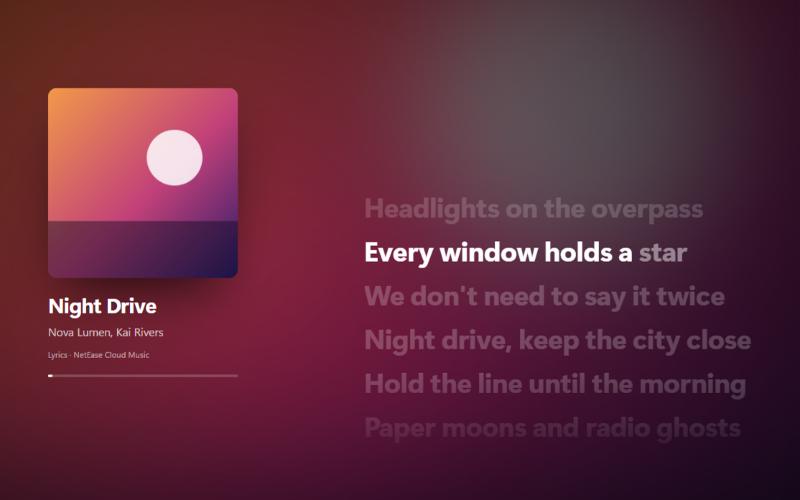
TV mode with synced lyrics
TV mode: full-screen cover art and word-synced lyrics, on any connected screen.
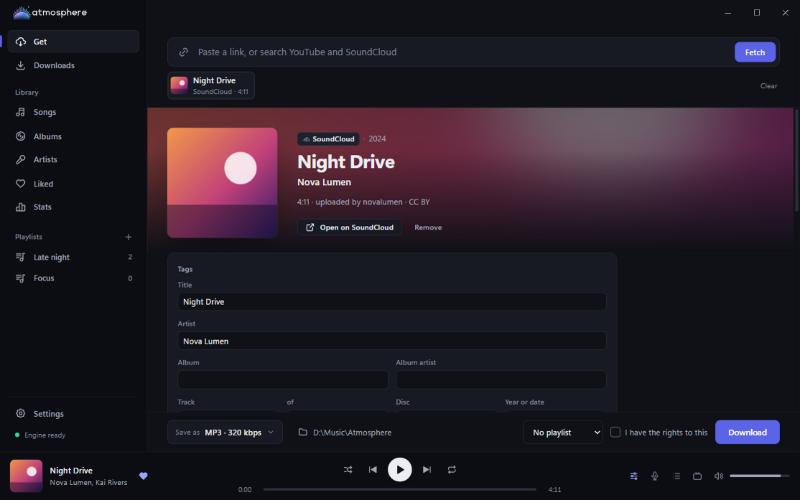
Getting a track
Get: honest format choices, editable tags, lyrics detected from the description.
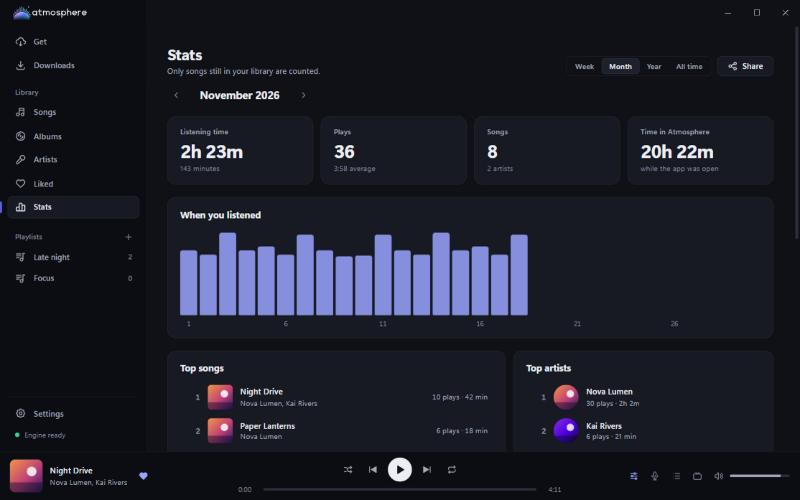
Listening stats
Stats: listening time, plays, and top songs, artists and albums by week, month or year.
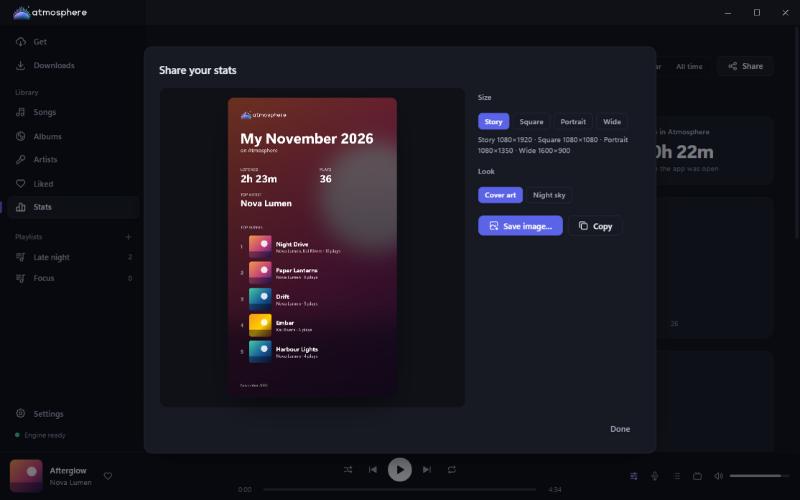
Shareable stats card
Share cards: branded images sized for Stories, posts, X and Discord.
Screenshots use demo data with generated cover art. ## Features ### Library - **Your folders:** the download folder plus any music folders you add. Scans are incremental, and a **live file watcher** picks up added, moved or deleted files within about a second. - **Songs, Albums, Artists, Liked.** The song list is virtualized, so big libraries scroll smoothly. Search and sort everywhere. - **Artist profiles** with popular tracks, albums, singles & EPs, appears-on, and a photo and bio you can attach. - **Playlists are real folders** on your drive, so phones, USB drives and other players can use them as-is. Songs are hard-linked (no extra space) or copied, and a `playlist.m3u8` keeps the order. - **Use folders you already have** as playlists. Atmosphere never moves or deletes them. If one goes missing (renamed, moved, or on an unplugged drive), it's marked as missing with **Locate folder**, and it comes back by itself when the drive reconnects. - **Multi-select** with Ctrl/Shift-click. Drag songs onto playlists, play next, add to queue, edit tags, **remove from library** (the file stays) or **delete from device** (sent to the Recycle Bin or Trash). ### Player - Queue, shuffle and repeat. Resumes where you left off, works with OS media keys, and counts plays. - **Sound panel:** - Presets: Bass boost, Vocal, Rock, Hip-hop, Nightcore, Slowed + reverb, Vaporwave, Lo-fi, 8D, Concert hall, and your own. - A 10-band EQ you shape by dragging. - Low-cut and high-cut filters, reverb and 8D panning. - **Pitch** (±12 semitones) and **tempo** (0.5×–2×), changed independently, or linked in **Vinyl** mode. - An Effects on/off switch for instant comparison. - **TV mode** (`F`): full-screen with the cover-art backdrop and big synced lyrics, or a visualizer when there are none. Sends to a second screen when one is connected. - **Mini player** (`P`): a small window with optional cover art, a blurred-cover backdrop, a queue you can drag to reorder, and always-on-top. ### Lyrics - Synced line by line, plus **word by word** when the source supports it. Click a line to jump, nudge the timing, and save `.lrc` files. - **Soft focus:** lines blur gently the further they are from the one being sung, and hovering any line brings it into focus. You can turn this off in Settings. - **Free sources:** no key needed and on by default. | Source | Key | Notes | | --- | --- | --- | | Your files | No | Embedded lyrics tags and `.lrc` sidecar files | | [LRCLIB](https://lrclib.net) | No | Free, community-synced library | | NetEase Cloud Music | No | Free; often word-synced, with translations | | Musixmatch | Your key | Official developer API (free tier available) | | Kugou | No | Often blocked outside China, so it's off by default | | Custom | Yours | Any service you have access to: URL template, headers, key and format | - **Attach your own lyrics** while downloading or later. Paste or import a `.lrc`/`.txt` file, then sync it yourself with **Stamp current time** while the song plays. - **Lyrics in descriptions:** lyrics an artist put in a SoundCloud description are detected, split from the credits and links, and prefilled. ### Downloads - One bar for links and search (YouTube and SoundCloud). Paste anywhere, drag links in, or accept the "Use copied link" offer. - **Direct file links** ending in `.mp3`, `.wav`, `.flac`, `.mp4` and similar are checked first to make sure they're real media, then read for their actual bitrate, length, tags and cover art. - **Release detection:** Album, EP, Single, LP, Compilation, Mixtape, Playlist, Profile and Channel. This drives track numbering, album tags and folder names. - **Save as** describes outcomes: - Original file - Best quality - MP3 - M4A - FLAC/WAV - Video at the resolutions that item actually has **Bitrates never exceed the source.** Matching codecs are copied rather than re-encoded. - Metadata editing per release and per track: composer, ISRC, BPM, key, cover art and trimming. - Downloads run in **track order**, with progress, retry, history, and skipping of anything downloaded before. - Extras: chapters, subtitles, SponsorBlock, a speed limit, a proxy, and sign-in for your own private uploads, either from your browser or from a `cookies.txt` file. **Check** confirms it works and explains what to do if it doesn't. For example, Chromium browsers lock their sign-in while they're open. ### Connections - An optional **local API** lets other apps on your computer, like stream overlays, status tools or your own scripts, see what's playing, browse your library, control playback and send links to Get. - It's off until you turn it on, listens on `127.0.0.1` only, and needs a token that's shown once and stored only as a fingerprint. - You choose what apps may do, and browser pages are refused. See the [API guide](docs/api.md). ### Stats - Week, month, year or all time: listening time, plays, songs, artists, time in the app, a by-day chart, and top songs, artists and albums. - Songs you delete are removed from your history. - **Share cards** with the Atmosphere logo: - Story 1080×1920 - Square 1080×1080 - Portrait 1080×1350 - Wide 1600×900 Choose a cover-art or night-sky look, then save as PNG or copy to the clipboard. ### The app itself - **About 8 MB**, native on each OS. Custom title bar and right-click menus throughout. Light and dark themes. - **Portable:** `atmosphere.exe` runs from any folder. Put an empty file named `portable` next to it, and all data stays beside it. - **Tidy:** temp files and stalled partial downloads are cleared automatically on launch, whenever downloads finish, and on exit. **Settings → Storage** shows what Atmosphere keeps and lets you clean it up. - **Back up and restore** your settings, stats, liked songs and artist photos as a single `.zip` from **Settings → Storage**. - **Automatic updates:** Atmosphere checks this repo's releases and offers each new version with its notes. Updates are signed and verified before they install. You can turn checking off in Settings. - **Clean uninstall:** the Windows uninstaller keeps your data by default. If you choose to delete it, you're offered a backup first. Your music files are never touched. ## Get started ### Download Grab the latest version from [Releases](../../releases/latest). Installed copies keep themselves up to date. | Platform | Files | | --- | --- | | Windows | Setup `.exe`, `.msi`, or the portable `atmosphere.exe` | | macOS | `.dmg` (Apple Silicon and Intel) | | Linux | `.deb`, `.rpm`, `.AppImage` | On first launch: 1. Confirm the three rights statements. The Windows installer covers this on its licence page. 2. Let Atmosphere set up its engine: [yt-dlp](https://github.com/yt-dlp/yt-dlp) and [ffmpeg](https://ffmpeg.org), downloaded from their official releases and checksum-verified. On macOS, install ffmpeg with `brew install ffmpeg`. 3. Add your music folders in **Settings → Library**, or paste a link. ### Build from source You'll need [Rust](https://rustup.rs). On Linux, also install the WebKitGTK dependencies: ```bash sudo apt install libwebkit2gtk-4.1-dev libgtk-3-dev libayatana-appindicator3-dev librsvg2-dev patchelf ``` Run the app: ```bash cargo run --release ``` Build installers with the Tauri CLI: ```bash cargo install tauri-cli --version "^2" cargo tauri build ``` ## Keyboard shortcuts | Keys | Action | | --- | --- | | `Space` | Play / pause | | `←` `→` | Seek 5 seconds | | `Ctrl ←` `Ctrl →` | Previous / next track | | `M` | Mute | | `L` | Lyrics | | `Q` | Queue | | `F` | TV mode | | `V` | Show the music video, when a song has one | | `Ctrl K` | Search your library, or paste a link | | `Ctrl L` | Get: the link and online search bar | | `Ctrl B` | Collapse or expand the sidebar | | `P` | Mini player | | `Ctrl F` | Search the current view | | `Delete` | Delete the selected songs (with confirmation) | | `Ctrl A` | Select all in the current list | On macOS, use `⌘` in place of `Ctrl`. ## Responsible use Atmosphere is for media you own or are allowed to keep. - **Before first use**, you agree to three statements about rights and responsibility. On Windows, that's the installer's licence page. The portable app, macOS and Linux ask once inside the app. **Each download** also asks for confirmation. The app's backend enforces both, not only the UI. - It **never bypasses DRM or paywalls**, and skips preview-only media, the same way yt-dlp itself refuses encrypted formats. - **Artists recovering their own uploads** can enable downloads on the track and choose **Original file** to get the uploaded master. ## Project layout | Path | What's there | | --- | --- | | `src/main.rs` | Tauri setup, the rights gate, and app commands | | `src/engine.rs` | Installs and runs yt-dlp and ffmpeg (SHA-256 verified), portable mode | | `src/media.rs` | Link probing, playlist streaming, release detection, lyrics found in descriptions | | `src/downloader.rs` | The ordered download queue, format plans and progress | | `src/library.rs`, `src/libcmd.rs` | Library, artwork, folder playlists, stats, the file watcher, and the `atmo://` media protocol | | `src/lyrics.rs` | Lyrics providers, LRC and word-timing parsing, cache | | `src/storage.rs` | Temp-file cleanup and the Storage report | | `src/direct.rs` | Checks and reads direct audio and video file links | | `src/backup.rs` | Backup and restore of settings, stats and liked songs | | `src/api.rs` | The opt-in local API for other apps ([guide](docs/api.md)) | | `src/updates.rs` | Signed in-app updates from GitHub Releases ([releasing](docs/releasing.md)) | | `src/tagging.rs` | Writes tags, cover art and lyrics into files | | `ui/` | The interface in plain HTML, CSS and JS (no build step) | | `branding/`, `tools/` | The logo, wordmark lockups and installer art, all generated from code | | `site/` | The upcoming website | ## Acknowledgements Atmosphere is built on: - **Engine and app:** [yt-dlp](https://github.com/yt-dlp/yt-dlp), [FFmpeg](https://ffmpeg.org), [Tauri](https://tauri.app) and [lofty](https://github.com/Serial-ATA/lofty-rs). - **Icons:** [Tabler Icons](https://tabler.io/icons) (MIT). - **Lyrics:** the [LRCLIB](https://lrclib.net) community.

Made with care for people who still keep their music.